Clinician console

An EMR designed for the visit that never happens in a room.

Most EMRs were built for a clinic and adapted for video. This one starts from asynchronous review, adds synchronous when the protocol requires it, and treats documentation as something the clinician signs rather than types.

Consult review

Everything needed to decide, on one screen.

The unit of work is a consult, not a chart. Intake answers, history, medications, allergies, labs, prior notes and the interaction check are assembled before the clinician opens it.

Claim, review, disposeTake the consult, and it is exclusively yours with a countdown. Approve, decline with a reason, request more information, or escalate to a video visit — each disposition drives what the patient sees next.
The complete medication listEvery medication the patient is on across every program and prescriber — because an interaction check against a partial list is worse than none at all.
Interaction and allergy checking before signatureDrug–drug and drug–allergy screening runs against that full list and the documented allergies, and surfaces at the moment of prescribing rather than after.
Structured intake, not a PDFAnswers arrive as data the chart can reason about — scored, flagged and trended — so the clinician reads a summary rather than re-reading a form.
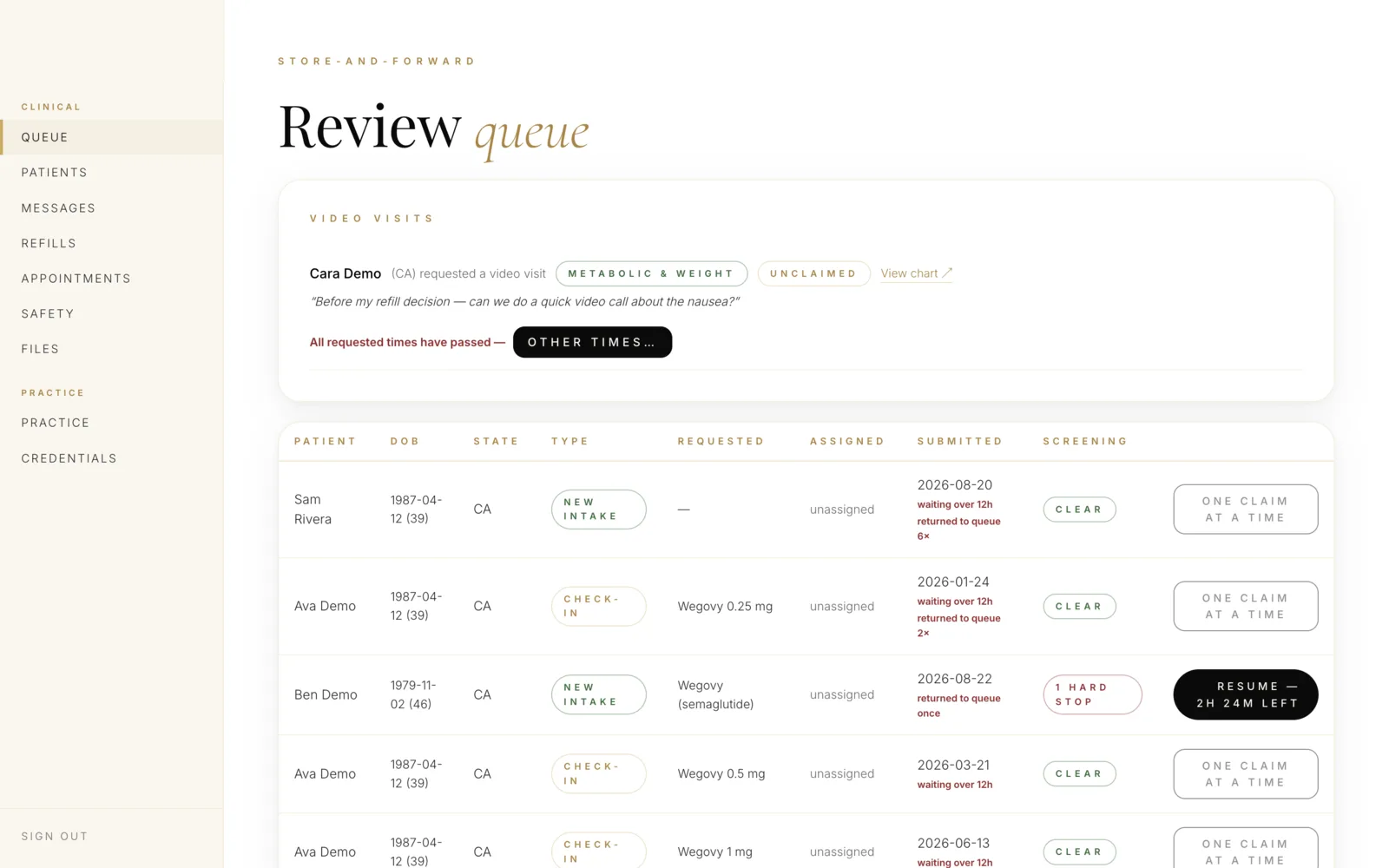
care.yourbrand.com/clinician/queue
Clinician review queue listing patients with state, request type, submitted time and screening status
The worklist before anything is opened: state, request type, how long it has been waiting, and what screening has already run. Demo environment; synthetic data.
One consult, end to end

What actually happens when a clinician opens a consult.

Everything below is the working product, captured from a demo environment with synthetic data. We show it in this much detail because the differences between platforms in this category are not visible in a feature list — they are visible in what the software makes easy, and what it makes impossible.

01

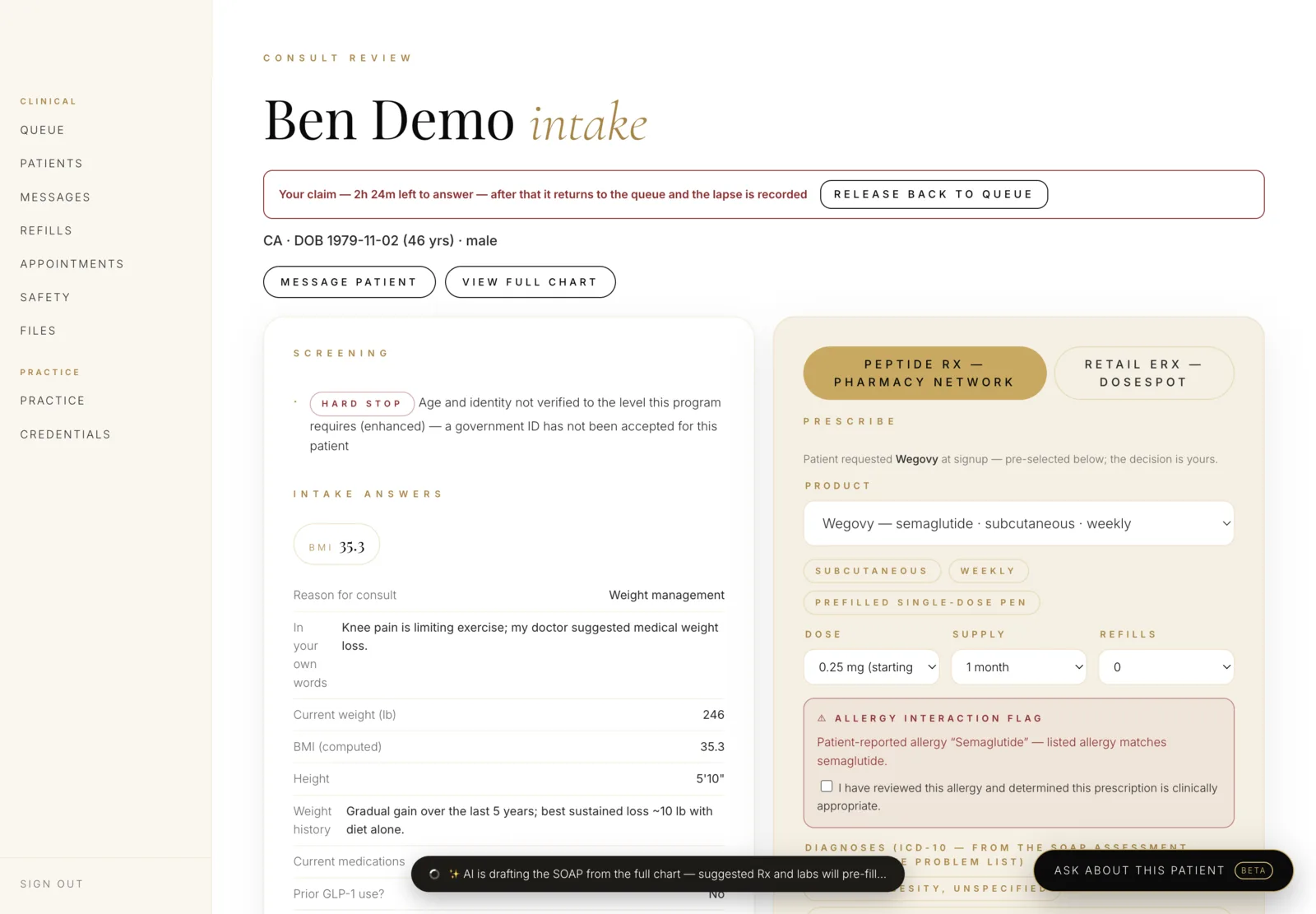
It arrives claimed, and the clock is showing

A consult belongs to one clinician at a time. The hold is explicit, it expires, and the lapse is recorded — so nothing sits in a queue quietly rotting, and no two people answer the same patient.

Consult review header showing the claim countdown and a hard-stop eligibility flag
  1. 1Your claim — 2h 24m left to answer. After that it returns to the queue and the lapse is on the record.
  2. 2A hard stop, not a warning: identity was never verified to the level this program requires, so prescribing is blocked before the clinician spends a minute on it.
02

The note is drafted. You are still its author

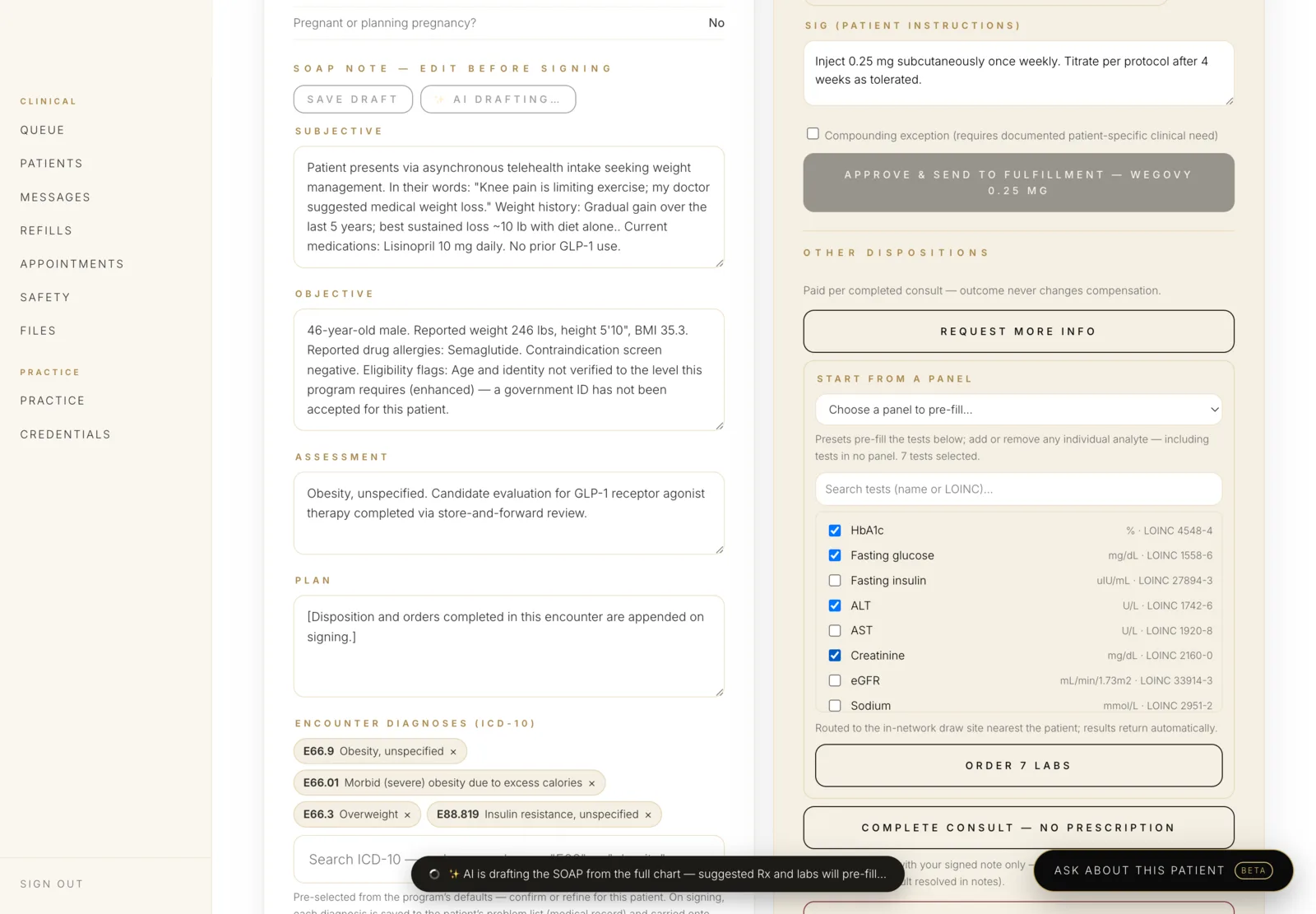
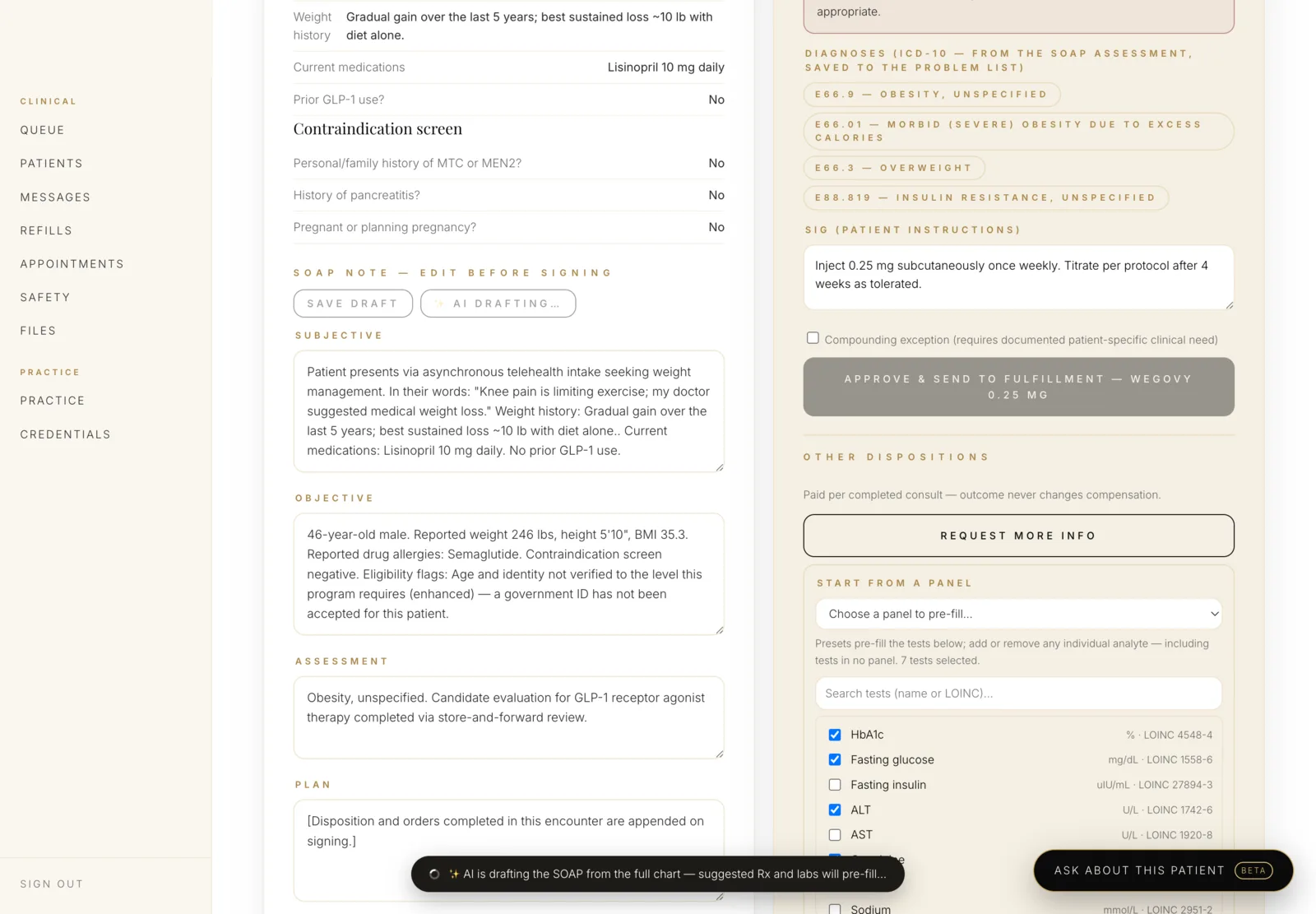
The chart is assembled and a SOAP note is drafted from it before the clinician opens the consult. Nothing is signed by a machine — the draft exists so the work starts from a full picture instead of a blank box at 9pm.

SOAP note with subjective, objective, assessment and plan, plus ICD-10 encounter diagnoses
  1. 1SOAP note — edit before signing. The draft is a starting point and it says so.
  2. 2Encounter diagnoses are ICD-10 coded and written to the problem list on signing, not typed as free text.
  3. 3Drafted from the full chart inside the platform. No PHI leaves the boundary to produce it.
03

Prescribing, with the guardrails in the path

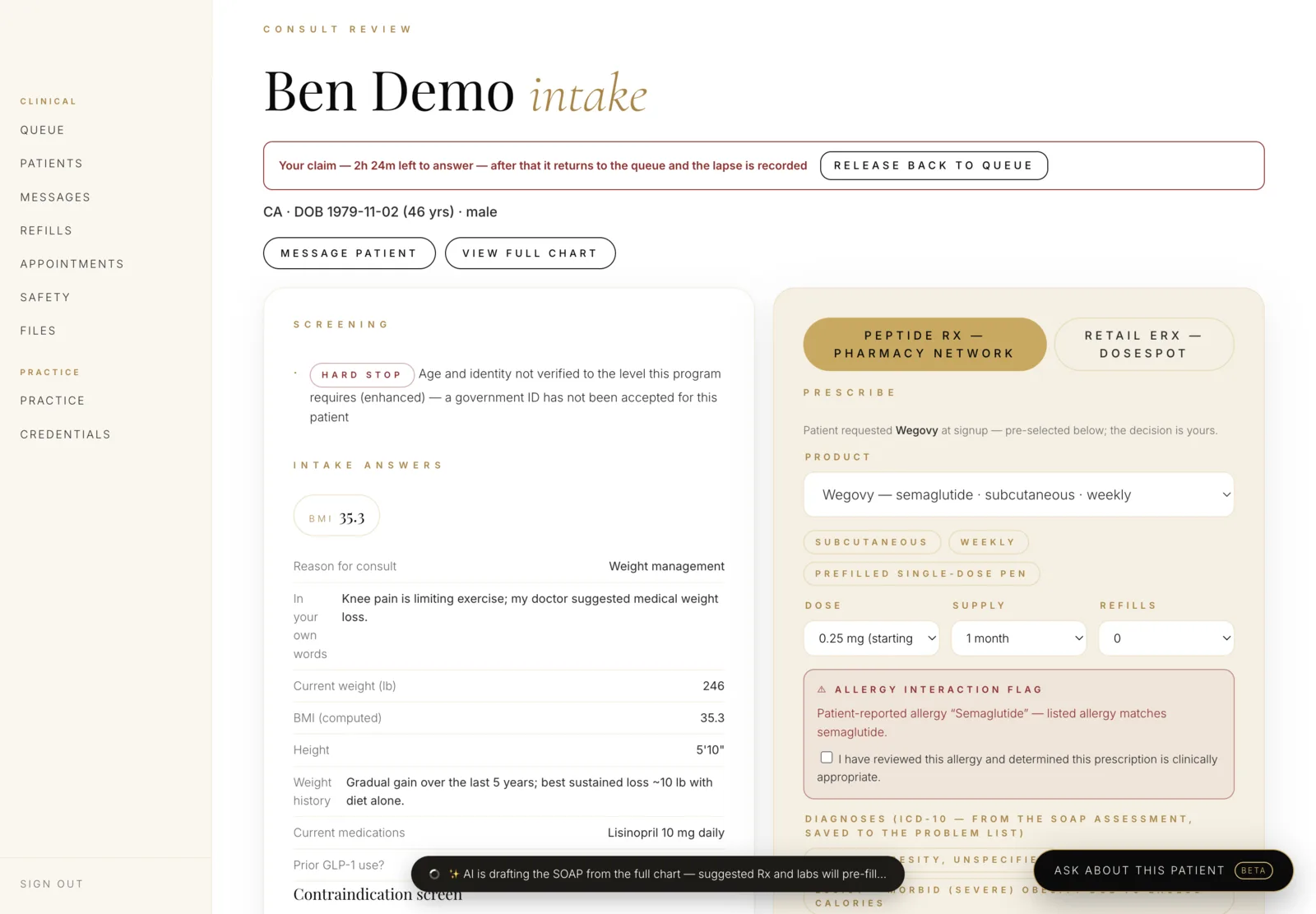
Two rails share one screen: compounded therapies through the pharmacy network, and retail e-prescribing. The safety checks are not advisory — they interrupt.

Prescribing panel with product, dose, supply and refills, and an allergy interaction flag
  1. 1Two prescribing rails, one decision: pharmacy network or retail e-prescribing.
  2. 2Product carries its own route and schedule — semaglutide · subcutaneous · weekly.
  3. 3Dose, supply and refills, bounded by a titration guardrail measured against this patient’s own history.
  4. 4An allergy match stops the flow. The clinician must tick I have reviewed this allergy — an attributed act, not a dismissed toast.
04

Labs ordered without leaving the consult

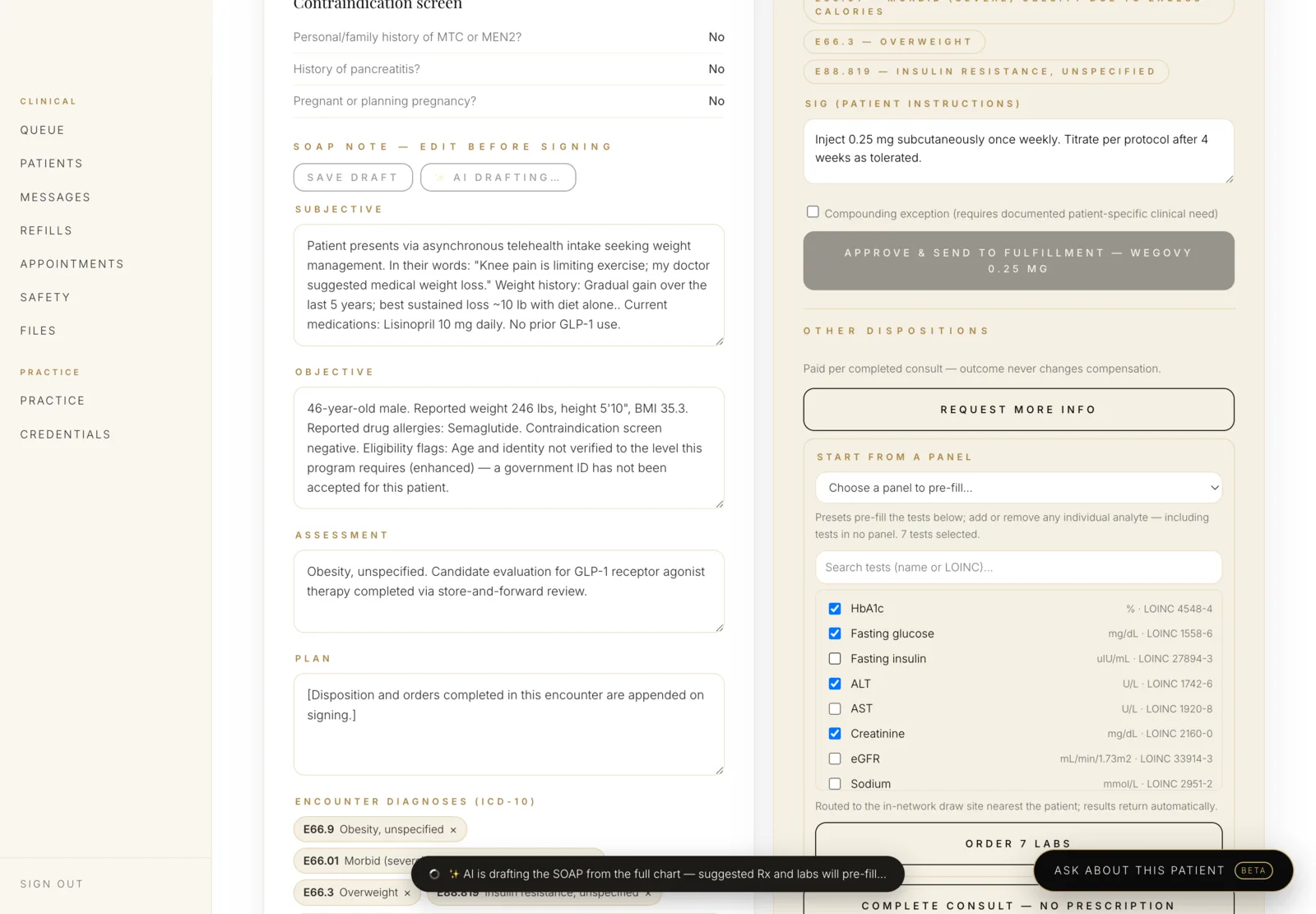
Panels pre-fill, individual analytes can be added or removed, and every test carries its LOINC code so the result comes back as structured data rather than a PDF someone has to read.

Lab ordering panel with preset selection and LOINC-coded individual tests
  1. 1Start from a panel, then change it. Presets are a default, never a cage.
  2. 2Every analyte is LOINC-coded — HbA1c 4548-4, ALT 1742-6, eGFR 33914-3 — so results return structured and trendable.
  3. 3Routed to the in-network draw site nearest the patient; results return automatically.
  4. 4One action orders the set.
05

Declining is as easy as approving

This is the part most platforms get wrong. If approving is one button and declining is a maze, you have built a machine that approves. Here the dispositions sit together, weighted the same, and the compensation line is on the screen where the decision is made.

Disposition options including approve and send to fulfillment, and request more information
  1. 1Approve and send to fulfillment, with the drug and dose named on the button itself.
  2. 2Paid per completed consult — outcome never changes compensation. Stated in the product, not only in a policy document.
  3. 3Request more information, or complete the consult with no prescription at all — same column, same weight.
06

Every decision is attributed, permanently

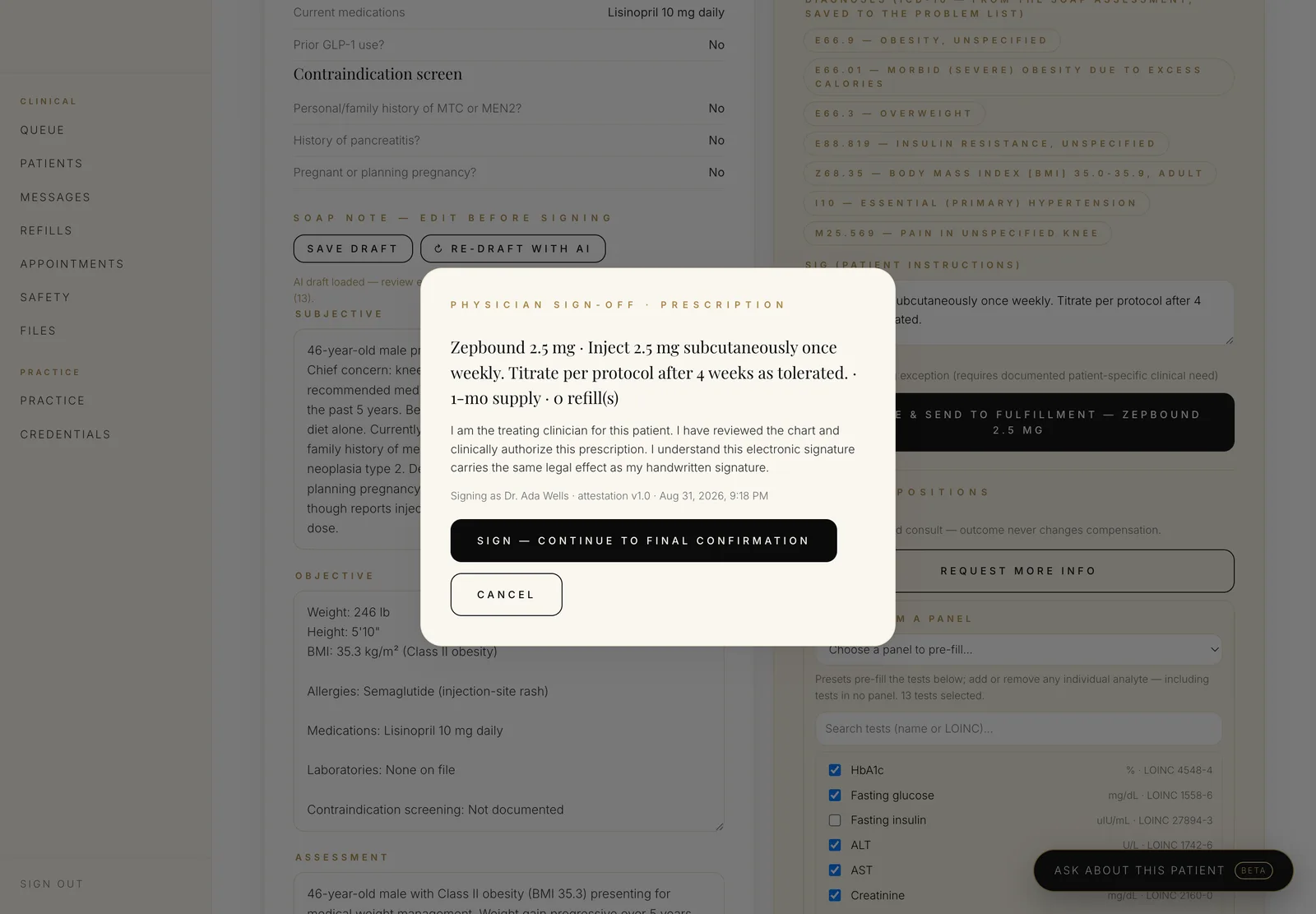
Signing is two steps, names the clinician, versions the attestation text and timestamps it. The audit entry is append-only: no role in the system, administrators included, can alter or remove it.

Physician sign-off dialog showing the prescription, attestation language and signing clinician
  1. 1The attestation is explicit: treating clinician, chart reviewed, electronic signature carrying the same legal effect as a handwritten one.
  2. 2Two steps, not one. Sign, then confirm — signing is never something that happens on a stray click.
Synchronous care

When a live visit is required, it happens here.

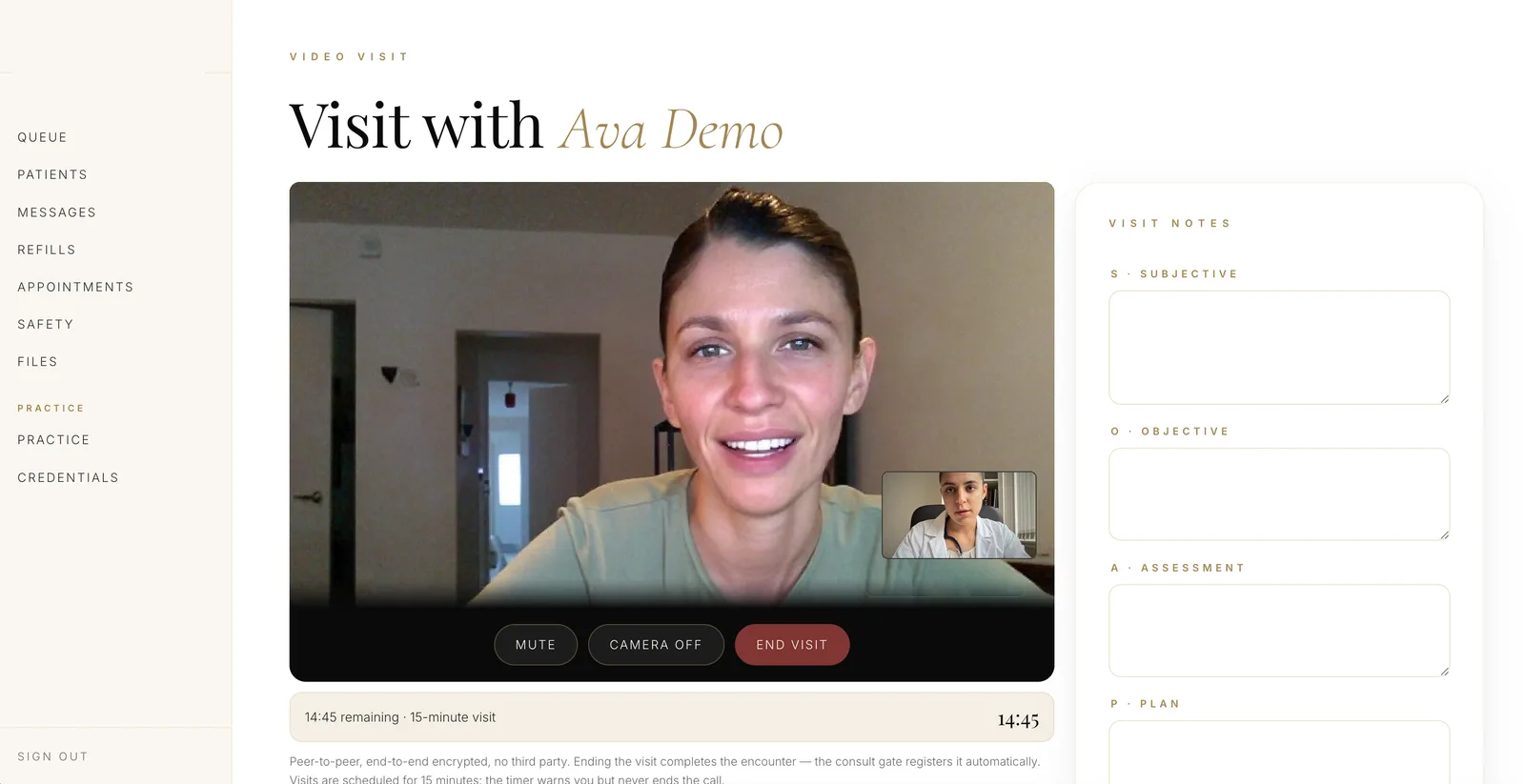
Some states and some programs will not accept an asynchronous encounter. Rather than hand the patient off to a separate video product and lose the thread, the visit runs inside the record — and ending it completes the encounter, so the consult gate registers the live visit automatically.

care.yourbrand.com/clinician/visit
Clinician video visit with the patient on screen and SOAP visit notes beside the call
Peer-to-peer and end-to-end encrypted, with no third party in the media path. The visit notes sit beside the call and prefill the consult review, so nothing is retyped. The timer warns at fifteen minutes but never cuts the call off. Demo environment; synthetic data, and the participants are composited stand-ins.
Ending the visit completes the encounter

The consult gate registers the live visit itself. No one has to remember to go and mark it done, which is exactly the kind of step that gets skipped and then fails an audit.

The notes are already the consult notes

Subjective, objective, assessment and plan autosave as the clinician types and carry straight into the consult review.

Escalation is a routing rule, not a judgment call

Where a state or a program requires a live encounter, the platform requires one — the clinician is not left to remember which states those are.

Clinical AI

Two AI features, one rule: the clinician signs.

Both run inside our own cloud account under a Business Associate Agreement. No patient data reaches a third-party model provider — a claim most platforms describing themselves as "AI-powered" cannot make, because their model vendor is someone else's API.

Ambient AI scribe

Visit audio becomes a structured SOAP note. The clinician edits and signs; nothing is filed on their behalf.

Medical-grade transcriptionTrained on clinical vocabulary, so drug names and dosages survive the transcript.
Structured into SOAPSubjective, objective, assessment and plan — drafted into the note editor, not pasted as a wall of text.
Signed, then immutableOnce signed the note is append-only. Corrections are addenda with their own author and timestamp.

Chart-aware clinical assistant

Ask the chart a question, draft a patient reply, or summarize a year of care — grounded in that patient's record.

Grounded, not generative-from-nothingAnswers are drawn from the patient's own record, so there is something to check them against.
Drafts messages, never sends themA suggested reply to a patient question waits for a clinician to read, edit and send.
Never the decision-makerThe assistant does not prescribe, approve or decline. Clinical responsibility sits with a named, licensed human.
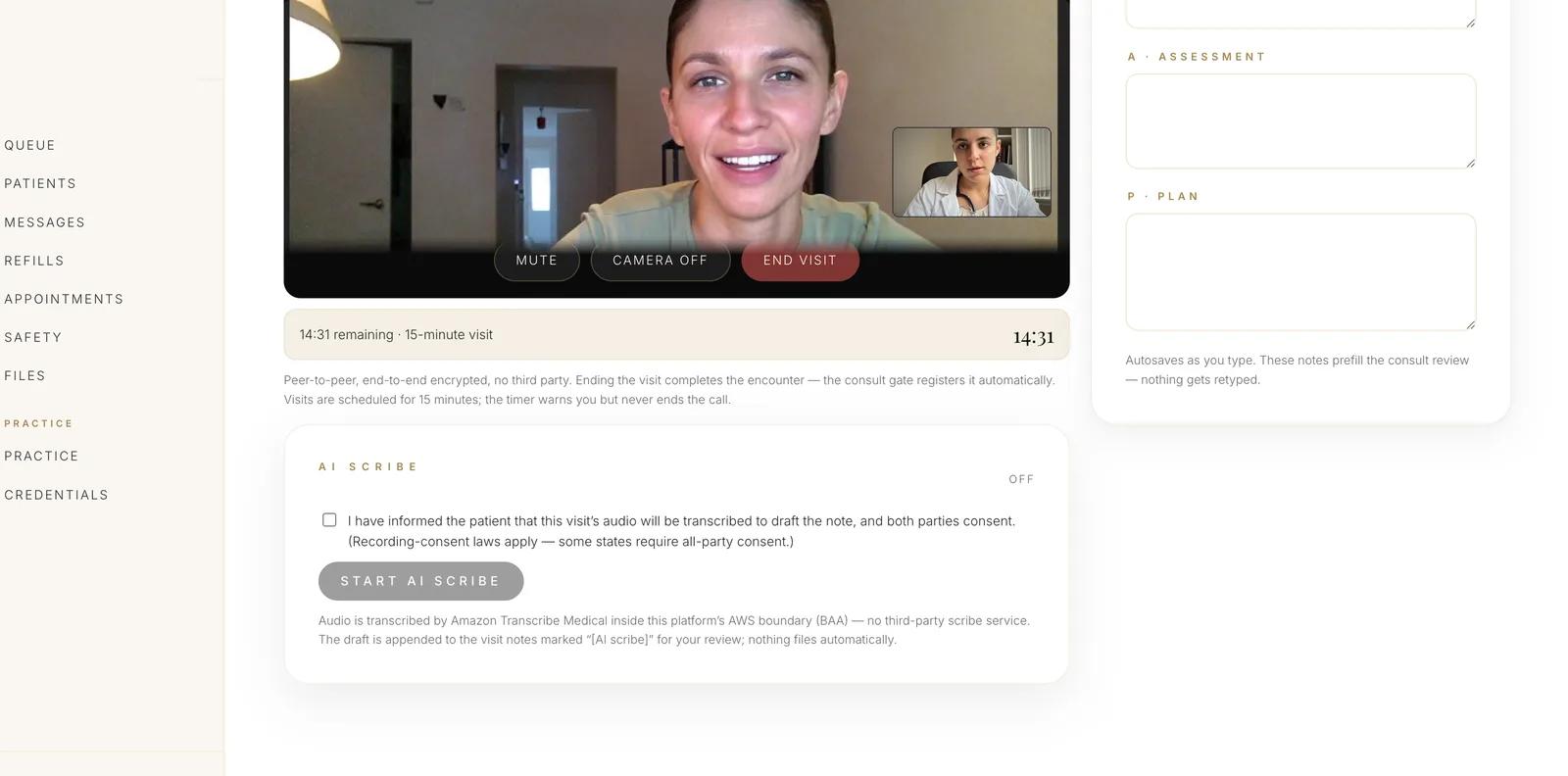
care.yourbrand.com/clinician/visit
AI scribe panel disabled until the clinician confirms both parties consented to recording
The scribe will not start until the clinician confirms the patient was told and both parties consent — recording-consent law is all-party in a number of states, and this is where that gets enforced rather than assumed. Audio is transcribed inside our own AWS boundary under a Business Associate Agreement; no third-party scribe service receives it. Demo environment; synthetic data, and the participants are composited stand-ins.
Prescribing & diagnostics

From decision to doorstep.

Surescripts-certified e-prescribing

Routed to retail and compounding pharmacies with formulary awareness and controlled-substance workflows.

e-Rx

503A compounding

30+ partners, with per-brand formulary control and state-level dispensing rules applied before the order is placed.

Fulfillment

Labcorp & Quest

Order sets and requisitions out, structured results back into the chart with trending and abnormal-value flagging.

Diagnostics

Refills as clinical decisions

A refill arrives with the check-in data attached and is reviewed, not auto-approved. Idempotent, so a retry can never issue twice.

Safety

Video when the protocol requires it

Native visits with a branded waiting room, and automatic escalation when a program or state mandates a live encounter.

Synchronous

Titration guidance

Dose escalation schedules tied to the program protocol, surfaced to the clinician and mirrored to the patient.

Protocol
Keep going

The rest of the platform

Watch a consult go from queue to prescription.

Including the interaction check, the AI-drafted note and the signature that makes it immutable.