Operations console

Run the business without filing a ticket.

Programs, consents, intake, check-ins, pricing, roster and fulfillment are configuration — edited by your team, versioned by the platform, live without a release. The console is where a care company is actually operated.

Configuration

Everything clinical is data, not code.

The difference between a platform and an agency is whether you can change your own product on a Tuesday afternoon. Each of these is editable per brand, versioned, and takes effect on the next patient — not the next sprint.

Programs

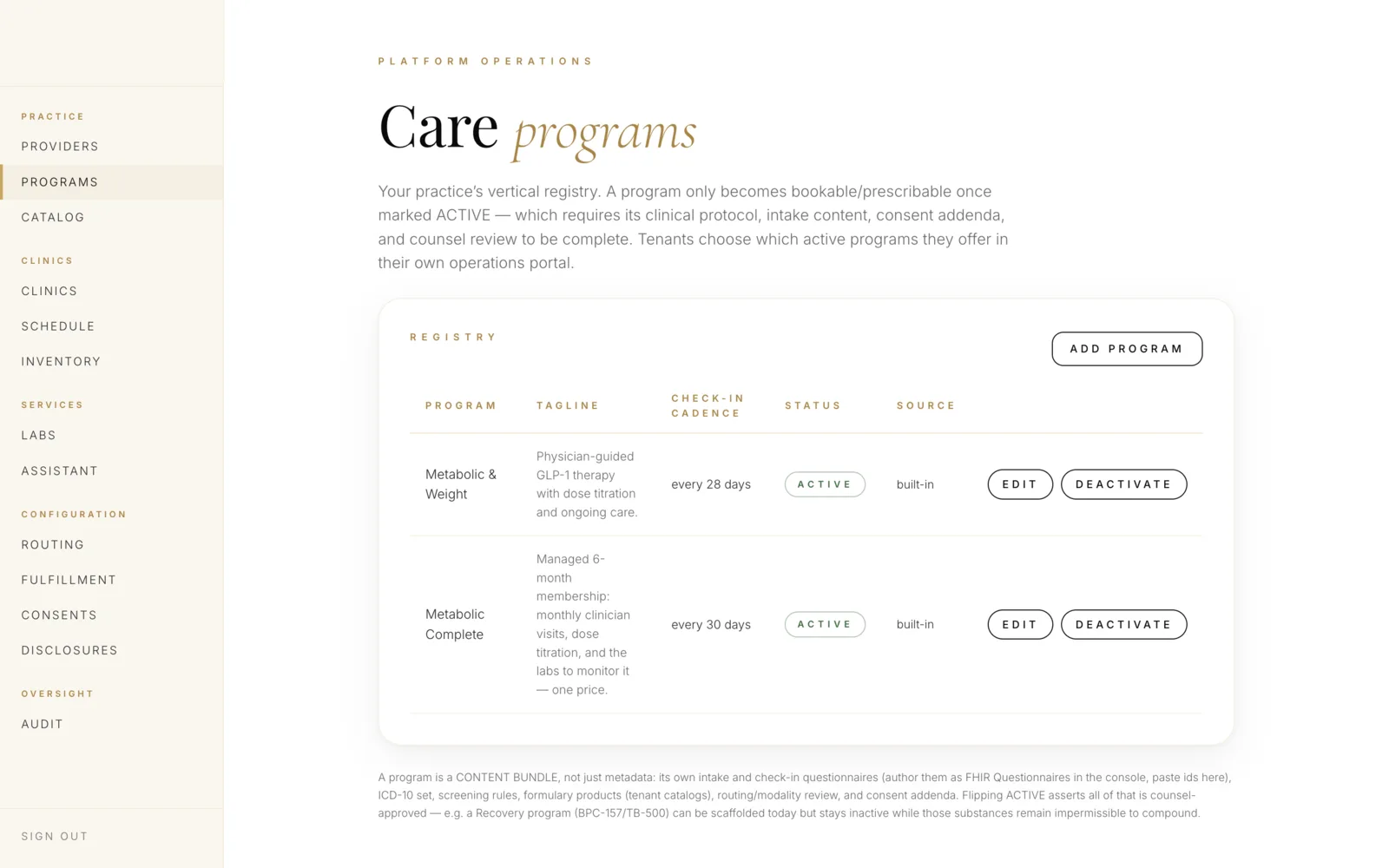
A program bundles everything a therapy needs. Create one, and the storefront, intake, routing and fulfillment reshape around it.

  • Name, description, imagery and storefront placement
  • Clinical protocol and eligibility criteria
  • Formulary — which medications and which compounding partners
  • Required specialty for routing
  • Modality rules: async permitted, or video required
  • Identity-verification depth required before enrollment
  • Pricing, subscription cadence and refill policy
  • Check-in schedule and titration guidance

Consent documents

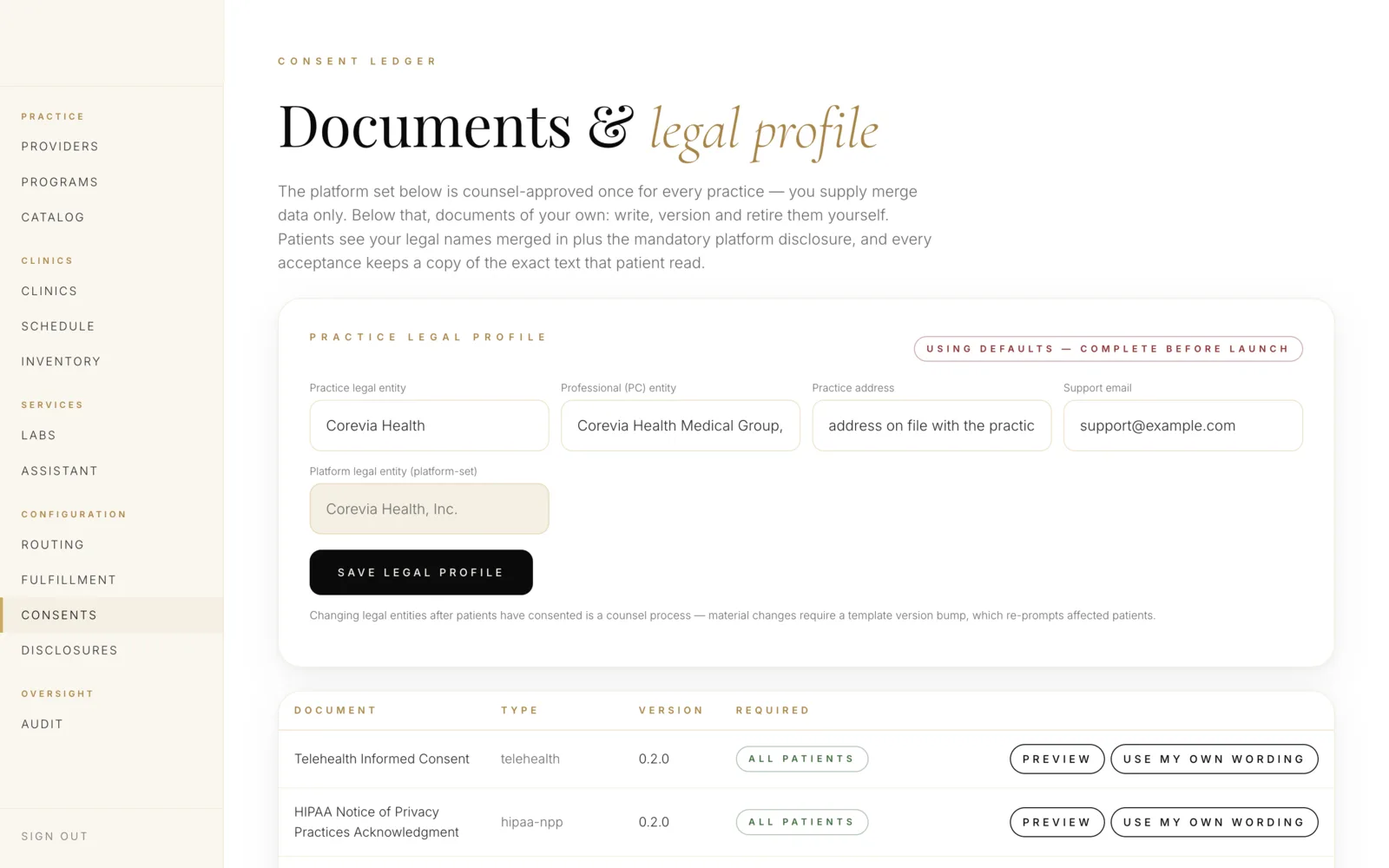
Consents are versioned legal records, not checkboxes. The platform stores what the patient actually agreed to and when.

  • Telehealth consent, per state where required
  • HIPAA Notice of Privacy Practices acknowledgement
  • Terms of use and financial responsibility
  • Program-specific risk consents — hormone therapy, controlled substances
  • Per-brand entity names merged into the text automatically
  • Versioned: a change creates a new version, prior agreements stay intact
  • Re-consent triggered when a material version changes
  • Every acceptance timestamped and attached to the chart

Intake forms

Build the questionnaire that decides who is eligible — and let it do the screening before a clinician's time is spent.

  • Question types: choice, scale, free text, date, measurement, upload
  • Conditional branching on any previous answer
  • Clinical scoring and automatic eligibility screening
  • Hard stops that decline enrollment with an explanation
  • Soft flags that route to a clinician for judgment
  • Required document and photo capture
  • Partial save and resume across devices
  • Answers stored as structured data, not a PDF

Check-in forms

The follow-up questionnaire that turns a prescription into a monitored program — and catches the patient who is struggling.

  • Cadence set per program, or per patient on a clinician's instruction
  • Structured capture: weight, dose, adherence, side effects
  • Trending, so change over time is visible at a glance
  • Thresholds that escalate into the consult queue automatically
  • Titration prompts tied to the protocol
  • Refill eligibility gated on a completed check-in
  • Reminders through the patient's own branded channel
  • Missed check-ins surfaced to ops before they become churn

Everything above is per brand. Two companies on the same platform can run the same therapy with different protocols, formularies, prices, consents and check-in cadences without either one knowing the other exists.

The console

One place to run clinical, supply and revenue.

Most platforms give you a dashboard. This is an operating surface — the things that break a care business, visible before they break it.

Roster & credentialingAdd clinicians, record NPI and DEA, track state licenses with expiry dates, and see coverage by state before you promise it to a marketing calendar.
License expiry, before it bitesExpiring licenses are flagged and the clinician notified in advance. On expiry, routing stops automatically — a lapsed license can never quietly keep taking consults.
Queue analyticsVolume, wait time, time-to-first-review, claim expiry and escalation rates — by brand, program and state, so you know where capacity is short before patients feel it.
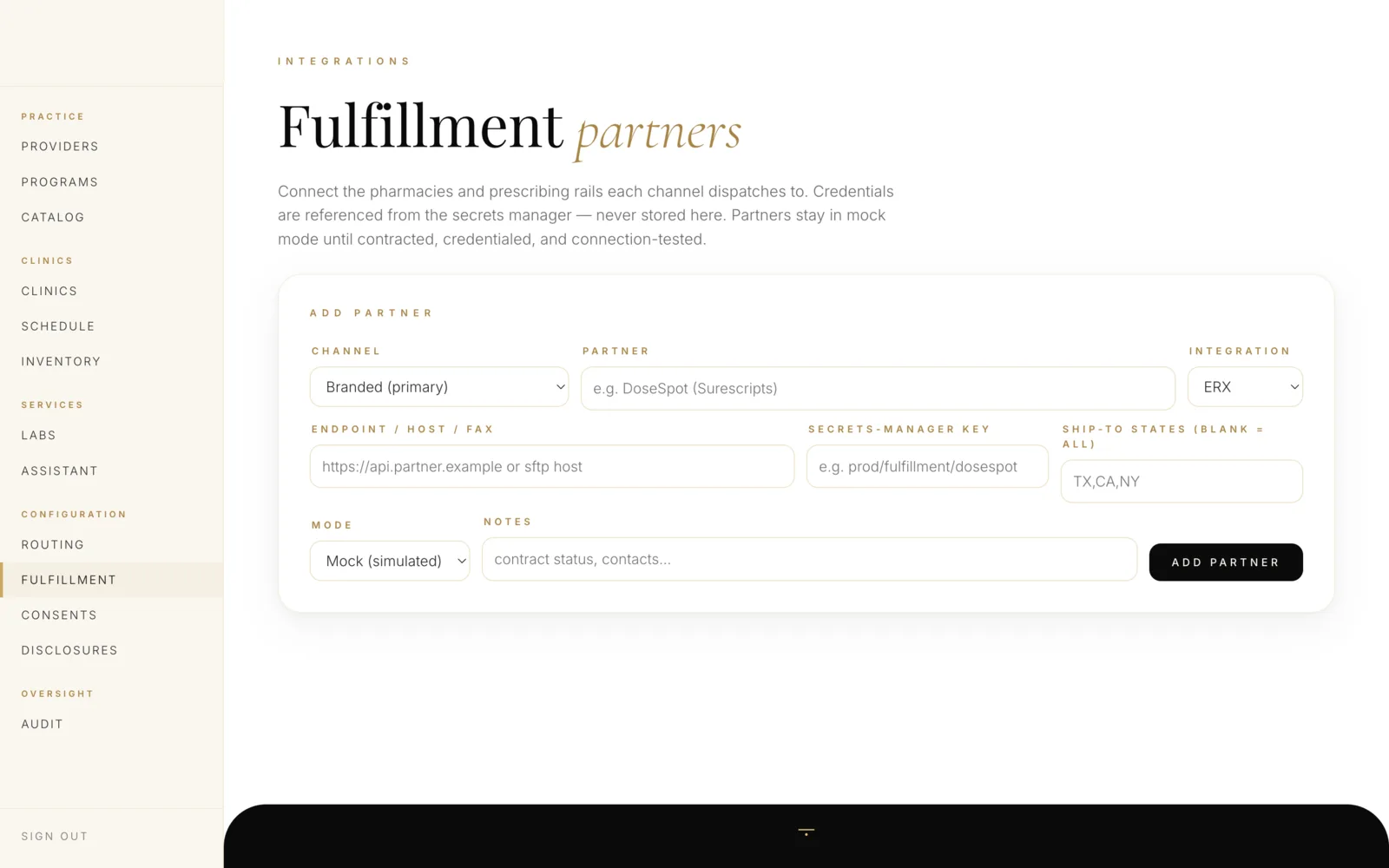
Fulfillment & pharmacy operationsWhich partner serves which state, formulary per brand, order status, exceptions and shipment visibility in one queue rather than five portals.
Revenue & splitsSubscriptions, one-off charges, refunds and multi-party revenue splits reported per brand — reconciled against the clinical record rather than a separate spreadsheet.
Audit & compliance reportingWho accessed which record, when and why — exportable for an audit, and append-only so the report cannot be edited into something more convenient.
Multi-brand

Operate one brand, or forty, from the same console.

Each brand is an isolated clinical project with its own record, policies and configuration. The console lets an operator move between them; the data never does.

Provision a brand

Domain, identity, programs, consents and pricing — a new tenant stands up as configuration, with its own isolated clinical record from the first patient.

Choose the clinical model

Practice-only with your own physicians, marketplace on the Corevia network, or hybrid running both together in one practice.

Cascade what should be shared

Push the network roster, formulary or a protocol update across the tenants that should receive it — and only those.

Separate what must not be

Patients, charts, messages and audit trails never cross a brand boundary. Isolation is enforced by access policy at the data layer.

Per-brand feature control

Turn video, AI assistance, compounding or a program on for one brand without touching another.

Delegated administration

Give a brand's own operators access to their configuration and roster — scoped so they see their tenant and nothing else.

Change safety

Configurable does not mean fragile.

Giving operators the power to change clinical configuration is only responsible if the platform refuses the changes that would hurt someone.

Consents are versioned, never overwritten

Editing a consent creates a new version. What a patient agreed to in March remains exactly what they agreed to, and a material change can require re-consent before the next visit.

An unrecognized program gets the strictest treatment

If a program's verification requirements can't be resolved, the platform demands the deepest check rather than the shallowest. Ambiguity fails safe.

Protocol changes don't rewrite history

Signed notes, issued prescriptions and completed intakes keep the protocol version in force at the time. The record reflects the care given, not today's configuration.

Every configuration change is attributed

Who changed the formulary, the price or the eligibility rule — and when — is on the audit trail alongside clinical access.

Access is scoped, including for your own staff

An operations user administers configuration without gaining clinical access to charts. Being able to edit a program is not permission to read a patient.

The operations console

Configuration is a screen, not a support ticket.

Programs, state routing, consent documents, clinic locations and fulfillment routing are yours to change. None of the below required an engineer, a release, or a support ticket.
care.yourbrand.com/programs
Care programs with check-in cadence, status and source
Programs, with their check-in cadence and whether they are live. Demo environment; synthetic data.
care.yourbrand.com/routing
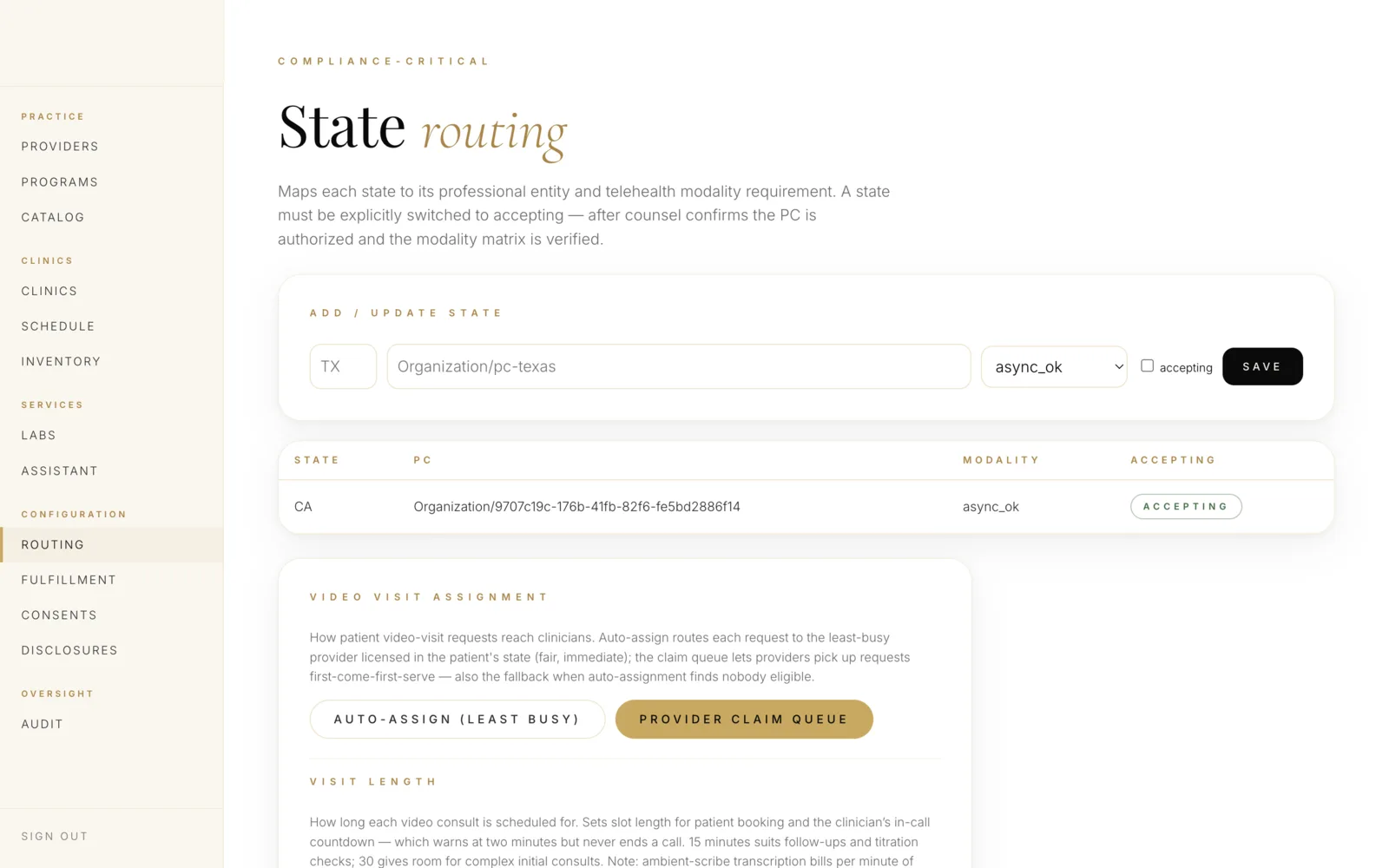
Per-state routing showing the enforced modality for each state
State by state, the modality the law requires — enforced by the server, not by training. Demo environment; synthetic data.
care.yourbrand.com/consents
Consent documents and legal profile with versioning
Consents and legal documents, versioned, with your own wording if you want it. Demo environment; synthetic data.
care.yourbrand.com/fulfillment
Fulfillment partners with the prescribing rail each channel dispatches to
Which pharmacy each channel dispatches to, and on which prescribing rail — changed by your team, not by ours. Demo environment; synthetic data.
Keep going

The rest of the platform

Change a program live, on the call.

We'll edit an intake form, version a consent and watch it reach the patient experience while you're still watching the screen.